Remote access technology has evolved far beyond the days of clunky VPNs and complex terminal setups. Today’s IT professionals need solutions that are quick to deploy, easy to use and capable of bridging different operating systems without friction. Browser-based remote desktop software addresses these challenges by allowing technicians to connect to devices directly through a web browser, eliminating the need for additional software installations on every machine.
For organisations managing diverse environments—whether Windows servers, Linux workstations or macOS laptops—this approach streamlines workflows and reduces setup time. Instead of configuring each device individually, IT teams can access remote systems from any location, using nothing more than a standard web browser. This flexibility is particularly valuable for businesses with distributed teams or those supporting clients across multiple sites.
How Cross-Platform Compatibility Eliminates IT Bottlenecks
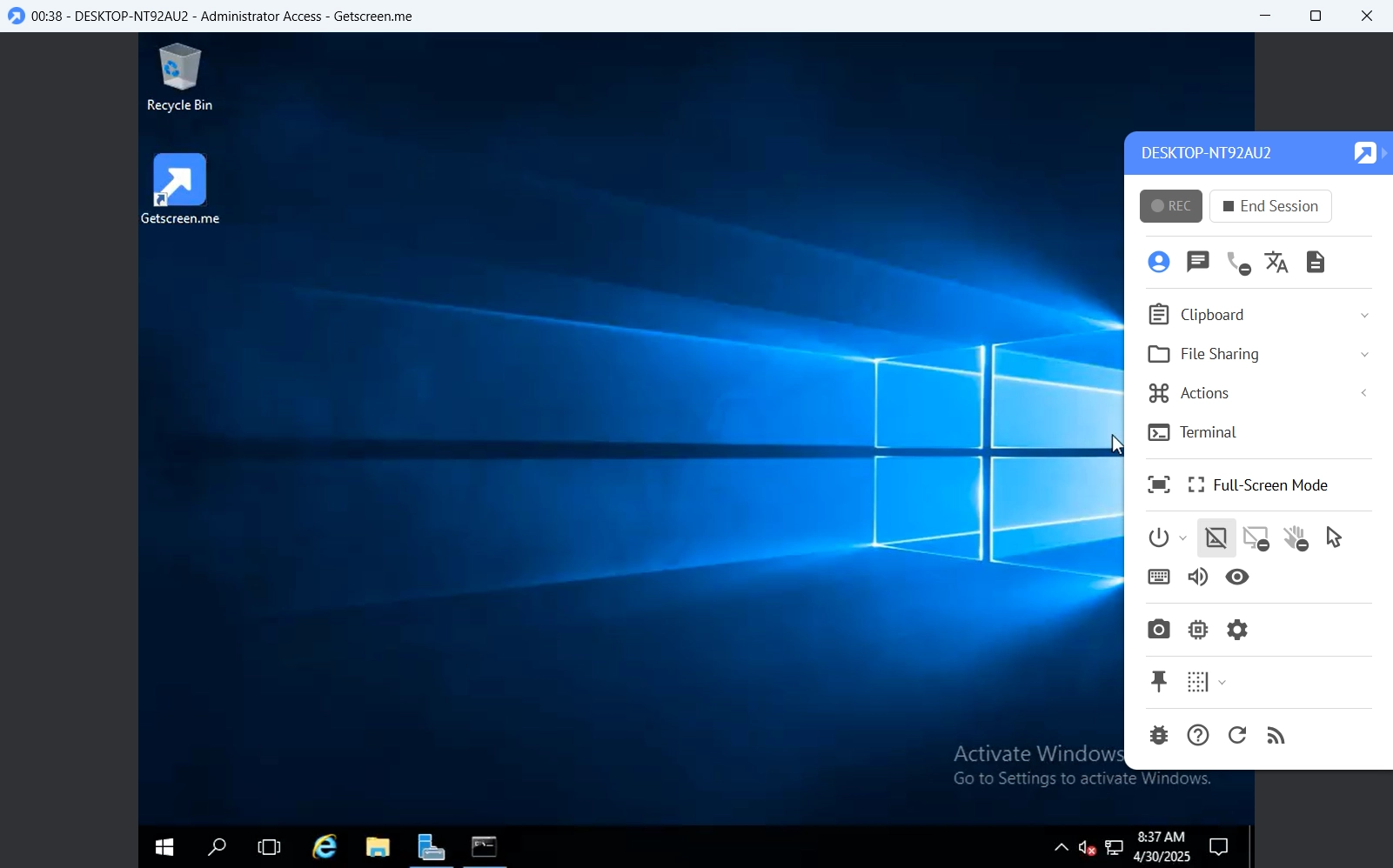
One of the most persistent headaches in IT administration is managing systems running different operating systems. A Linux server might need troubleshooting from a Windows laptop, while a macOS user requires support for a legacy application. Browser-based remote access platforms like Getscreen.me – remote access software remove this barrier by providing a unified interface that works across Windows, macOS, Linux and even Android devices.
This cross-platform support isn’t just about convenience—it’s about efficiency. IT teams can switch between devices without learning new tools or interfaces, reducing the learning curve and minimising errors. For managed service providers, this means faster response times and the ability to support a wider range of clients without investing in multiple remote access solutions.
Permanent Access Vs One-Time Support: Choosing the Right Approach
Not all remote access scenarios require the same level of connectivity. Some situations demand permanent, unattended access—such as maintaining an office workstation or managing a server—while others only need temporary connections for troubleshooting or training. Browser-based platforms cater to both needs by offering flexible session types.
For routine maintenance, permanent access allows technicians to log in without requiring someone at the remote site to grant permission each time. On the other hand, one-time support sessions are ideal for ad-hoc assistance, where a quick connection is all that’s needed to resolve an issue. This dual capability ensures that IT teams can adapt their approach based on the situation, rather than being constrained by their tools.
File Transfers and Terminal Access: the Hidden Productivity Boosters
Remote access isn’t just about viewing a screen—it’s about performing tasks efficiently. Modern browser-based solutions include integrated file management, allowing technicians to drag and drop files between local and remote systems without switching applications. This feature alone can save hours of time compared to traditional methods like emailing files or using third-party transfer tools.
Terminal mode is another underrated feature that enhances productivity. Instead of navigating a full desktop environment, administrators can execute commands directly through a command-line interface. Whether it’s running a PowerShell script on Windows, executing a bash command on Linux or troubleshooting a macOS shell issue, terminal access provides the precision needed for technical work without the overhead of a graphical session.
The Role of Session Recording in Compliance and Training
For businesses in regulated industries or those with strict IT governance policies, session recording is a critical feature. Browser-based remote access platforms often include the ability to record sessions, providing an audit trail for troubleshooting, training or compliance purposes. This not only helps organisations meet regulatory requirements but also serves as a valuable resource for onboarding new team members.
Imagine a scenario where a junior technician needs to learn how to resolve a specific issue. Instead of shadowing a senior colleague, they can review a recorded session to see exactly how the problem was diagnosed and fixed. Over time, this builds institutional knowledge and reduces dependency on key personnel, making the IT team more resilient.
Custom Branding and White-Label Solutions for Msps
Managed service providers (MSPs) often face the challenge of delivering remote support under their own brand while using third-party tools. Browser-based platforms that support custom branding allow MSPs to present a seamless experience to their clients, reinforcing their professional image. Features like custom logos, application names and access links ensure that the remote support process feels like an extension of the MSP’s own services.
This level of customisation isn’t just about aesthetics—it’s about trust. Clients are more likely to engage with an MSP that presents a polished, professional interface, even when the underlying technology is provided by a third party. For MSPs looking to differentiate themselves in a competitive market, white-label remote access can be a subtle but effective way to stand out.
API Integrations: Embedding Remote Access into Existing Workflows
For software developers and IT teams building custom solutions, the ability to integrate remote access functionality into existing applications is a game-changer. Browser-based platforms with robust APIs allow organisations to embed remote sessions directly into their customer portals, management dashboards or even internal tools. This eliminates the need for users to switch between applications, creating a more cohesive and efficient workflow.
For example, a software company could integrate remote access into its customer support portal, enabling technicians to connect to a user’s device with a single click. Similarly, an IT department could embed remote sessions into its asset management system, providing instant access to any device from a centralised interface. These integrations reduce friction and make remote support a seamless part of daily operations.
Self-Hosted Options for Enhanced Security and Control
While cloud-based remote access solutions offer convenience and scalability, some organisations require greater control over their infrastructure. Self-hosted remote access platforms provide the best of both worlds—flexibility without sacrificing security or compliance. By hosting the software within their own environment, businesses can ensure that sensitive data remains within their network, reducing exposure to external threats.
This approach is particularly appealing to organisations in industries with strict data protection requirements, such as healthcare or finance. Self-hosted solutions also allow businesses to scale their remote access capabilities without relying on third-party providers, making them a future-proof choice for long-term IT strategies.
Real-World Applications: from IT Support to Remote Workforces
The versatility of browser-based remote access extends far beyond traditional IT support. For remote workers, the ability to access office computers from home or while travelling ensures continuity and productivity. For businesses managing distributed devices—such as digital signage or point-of-sale systems—remote access provides a way to monitor and troubleshoot systems without physical intervention.
In education, remote access can support IT teams managing computer labs across multiple campuses, while in healthcare, it enables technicians to maintain medical devices and systems without disrupting critical services. The applications are as diverse as the organisations that use them, proving that remote access is no longer a luxury but a necessity for modern IT operations.
Making the Right Choice for Your Team
When evaluating remote access solutions, the key is to look beyond basic functionality and consider how the tool will integrate into your existing workflows. Browser-based platforms offer a compelling balance of ease of use, flexibility and scalability, making them an ideal choice for IT teams of all sizes. Whether you’re a solo technician managing a handful of devices or part of a large enterprise supporting thousands of users, the right remote access tool can transform the way you work.
For those exploring options, platforms like Getscreen.me provide a robust set of features designed to meet the demands of modern IT environments. From cross-platform compatibility to session recording and API integrations, the capabilities extend far beyond simple screen sharing. The result is a solution that not only meets today’s needs but also adapts to the evolving challenges of remote IT management.
Looking Ahead: the Next Evolution of Remote Access
As technology continues to advance, the future of remote access will likely focus on even greater integration with existing tools and workflows. Expect to see more platforms offering AI-driven diagnostics, automated troubleshooting and deeper customisation options. For IT professionals, this means tools that not only provide access but also enhance productivity through intelligent automation and seamless integrations.
The shift towards browser-based solutions is just the beginning. As organisations increasingly rely on remote and hybrid work models, the demand for flexible, secure and easy-to-use remote access tools will only grow. By choosing a platform that aligns with your operational needs today, you’re not just solving an immediate challenge—you’re investing in a solution that will support your team’s efficiency and adaptability for years to come.